What Is a T2125 Spreadsheet Template?
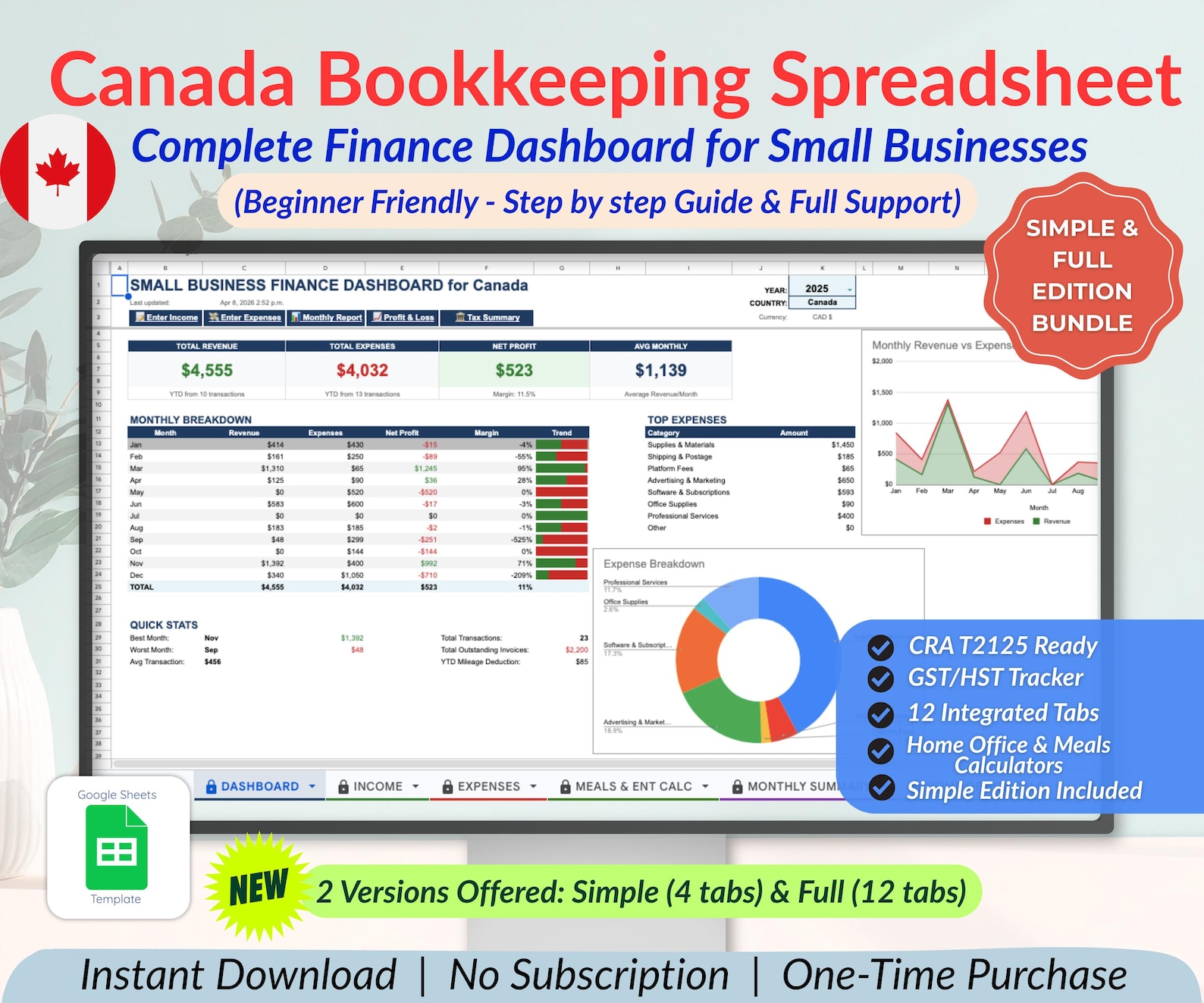
A T2125 spreadsheet template is a sheet whose expense categories match the lines on the CRA’s T2125 form, so at tax time you copy a total into a box instead of sorting a shoebox of receipts. A good one also tracks the GST/HST you collected and paid, because those numbers are needed separately and are the ones people most often lose.
The CRA is direct about what the form is for: “Use the T2125 form to report either business or professional income and expenses.” (Canada Revenue Agency, “T2125 Statement of Business or Professional Activities”). If you are self-employed in Canada, freelance, sell on Etsy, or run a side business as a sole proprietor, this is the form your income lands on.
Built for the T2125
Canada Bookkeeping Spreadsheet — CRA T2125 & GST/HST
Why a Generic Expense Tracker Costs You Money
A tracker with three columns — date, description, amount — tells you what you spent and nothing the T2125 asks for.
The form does not ask “how much did you spend”. It asks for advertising separately from meals, meals separately from motor vehicle costs, and motor vehicle costs separately from the business-use-of-home claim. If your tracker lumps everything together, the sorting still has to happen — in March, from a year of bank statements, trying to remember whether a payment was software or supplies. Anything you cannot identify by then is an expense you will not claim.
The fix is not more discipline. It is a sheet whose categories already match the form.
The Expense Categories a Canadian Small Business Should Track
These are the buckets that carry most sole-trader spending. Build your sheet with one column or tag per bucket and the year sorts itself.
- Advertising. Etsy ads, boosted posts, printed cards, listing promotion.
- Meals and entertainment. Only partly claimable, so keep it apart from everything else rather than discovering the limit later.
- Office expenses and supplies. Paper, ink, packaging, the small things that add up to real money.
- Professional fees. Your accountant, a lawyer, a bookkeeper.
- Management and administration fees. Marketplace commission and payment processing charges — ask your accountant which line yours belong on.
- Motor vehicle expenses. Needs a kilometre log to survive a question, so track distance as you drive, not in March.
- Business-use-of-home. A percentage of rent or mortgage interest, heat, electricity and internet, based on the share of your home you actually work in.
- Capital purchases. A laptop or printer is not a plain expense — it is depreciated over years, so keep these on their own tab.
Two rules make the whole year easier. Record the expense the week it happens, and write what it was for in plain words — “ink for December orders” beats “Staples”.
Tracking GST/HST as You Go
This is the part that catches people out, and it has nothing to do with the T2125 itself.
If you are registered, the sales tax you charge is not your money — you are holding it for the government. The tax you paid on business purchases can usually be claimed back. To file a return you need both numbers separately, all year, and they cannot be reconstructed from a single “total” column afterwards.
So every row in your sheet wants three figures rather than one:
- The amount before tax — this is what goes on the T2125.
- The GST/HST portion — this is what your sales tax return needs.
- The total paid — this is what matches your bank statement.
Rates differ by province, and if you sell across Canada you may charge different rates to different customers. A sheet that applies the right rate by province saves you doing that arithmetic on every order. Quebec is its own case, with QST alongside GST.
Google Sheets or Excel?
Google Sheets, for almost everybody. It is free, it saves as you type, you can open it on a phone in a shop to log a receipt, and you can share it with an accountant by sending a link instead of emailing a file that immediately goes out of date.
Excel is the better answer if your accountant insists on it, or if you already live in it. A template worth buying gives you both, so the decision is not permanent.
Building a Bookkeeping Spreadsheet in Canada
Building your own is genuinely fine, and for a business with twenty transactions a year it is the right call. Set up the categories above, add the three tax columns, and total each category at the bottom.
The calculation changes once volume does. A home-office percentage, sales tax split by province, a summary laid out like the form, and a dashboard of what you actually earned are not hard ideas, but they are a weekend of building and a lifetime of trusting. A formula error you never notice is worse than no spreadsheet at all, because you file from it.
Our Google Sheets templates guide covers what to look for in any template, and the Etsy expense tracking guide goes deeper on marketplace fees specifically.
A Sensible Routine
- Weekly, ten minutes. Enter the week’s income and expenses while you still remember what they were.
- Monthly, twenty minutes. Check the sheet against your bank statement. Fix differences now, not in a year.
- Quarterly. If you file sales tax quarterly, the numbers are already there.
- Annually. Read the category totals straight onto the T2125.
Keep your receipts as well. The spreadsheet is the summary; the CRA can still ask for the paper behind it.
Free: Simple Business Expense Tracker
Five working tabs — expense log, income, live category totals, a mileage log and a home-office calculator — plus an eight-minute guide, and a code for 10% off at our printables and spreadsheets shop, shop.layer7designs.com.
Your 10% code for shop.layer7designs.com comes with it. One email when something new is ready — unsubscribe whenever you like.
Keep Reading
- How to Track Etsy Expenses for Taxes
- Best Google Sheets Templates for Etsy Sellers
- Small Business Finance Tracker Template
This is general information about record keeping, not tax advice. Rules change and situations differ — check with an accountant or the CRA before filing.
Frequently Asked Questions
Who has to file a T2125?
Sole proprietors and partners reporting self-employment income, which includes freelancers, consultants and marketplace sellers. The CRA describes the form as the one used “to report either business or professional income and expenses”. It is filed with your personal return rather than separately.
Can I use a spreadsheet instead of accounting software?
Yes. Nothing about the T2125 requires particular software — what matters is that your records are complete and that you can produce the receipts behind them. A spreadsheet whose categories match the form does that, and costs nothing per month. Check the CRA’s record-keeping guidance for what you are required to retain.
How do I track GST/HST in a spreadsheet?
Split every row into three: the amount before tax, the tax portion, and the total. The pre-tax figure goes on the T2125, the tax portion feeds your sales tax return, and the total matches your bank. Reconstructing this at year end from single totals is close to impossible.
What can I claim for working from home?
A share of rent or mortgage interest, heat, electricity, and internet, based on the proportion of your home used for the business. Work out the percentage once, apply it consistently, and keep the calculation written down so you can explain it later.
Do I need a separate sheet for Quebec?
Quebec businesses deal with QST as well as GST and file with Revenu Québec, so a sheet built only for GST/HST will not cover it. Use a version that tracks both taxes separately rather than trying to bend a single tax column to do two jobs.