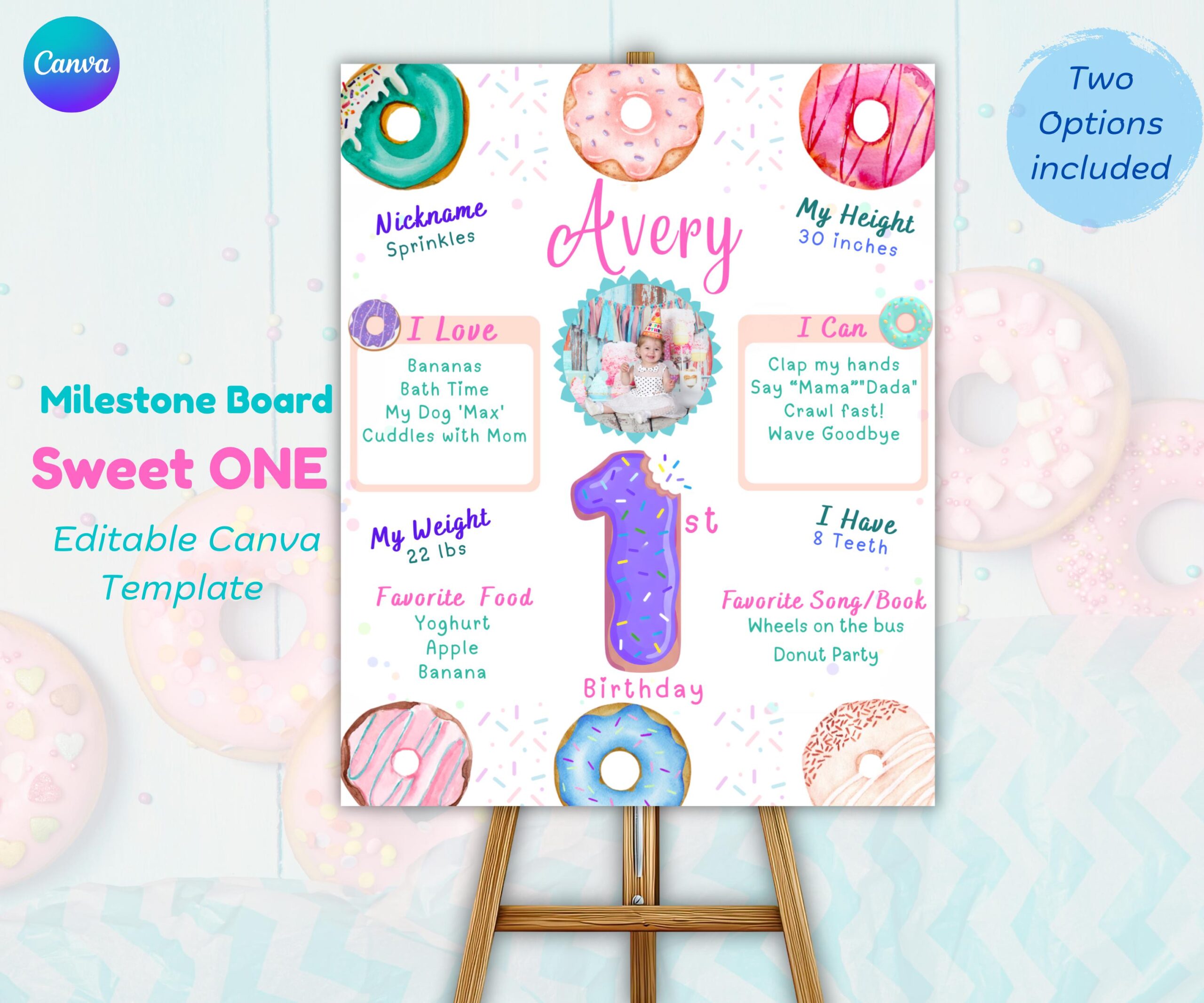
You’ve spent hours planning the perfect donut-themed first birthday party. The invitations are sent. The party favors are ready. But there’s one photo opportunity you can’t stop thinking about: that adorable milestone board showing everything your little one has accomplished this year.
Here’s the good news: you don’t need to be a graphic designer or spend $50+ on a custom sign. With our editable Donut Milestone Board template, you can create a professional-looking display in under 10 minutes—using just a free Canva account.
This step-by-step tutorial walks you through editing every field, from your child’s name to their favorite foods. By the end, you’ll have a printable milestone board ready to display at the party and keep as a keepsake for years to come.
What Is a Donut Milestone Board?
A milestone board (sometimes called a stats sign or birthday infographic) displays all the adorable details about your child’s first year. Think weight, height, first words, favorite foods, and funny habits—all in one visually appealing display.
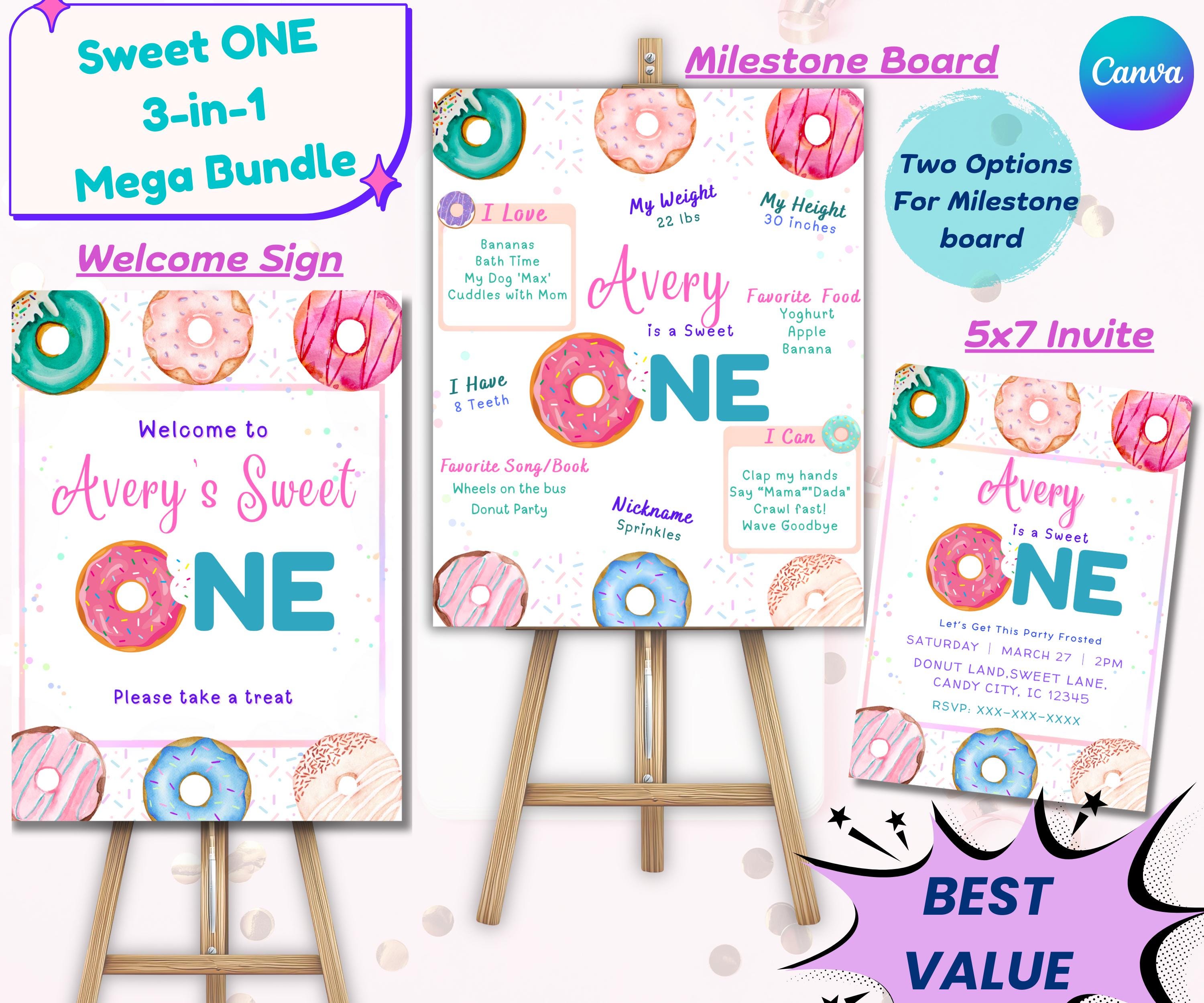
For a Sweet One donut party theme, this board ties your entire decoration scheme together. The pastel donuts, hot pink accents, and teal details match your invitations, welcome sign, and cake toppers perfectly.
Why parents love this template:
- Editable in Canva — No design software needed
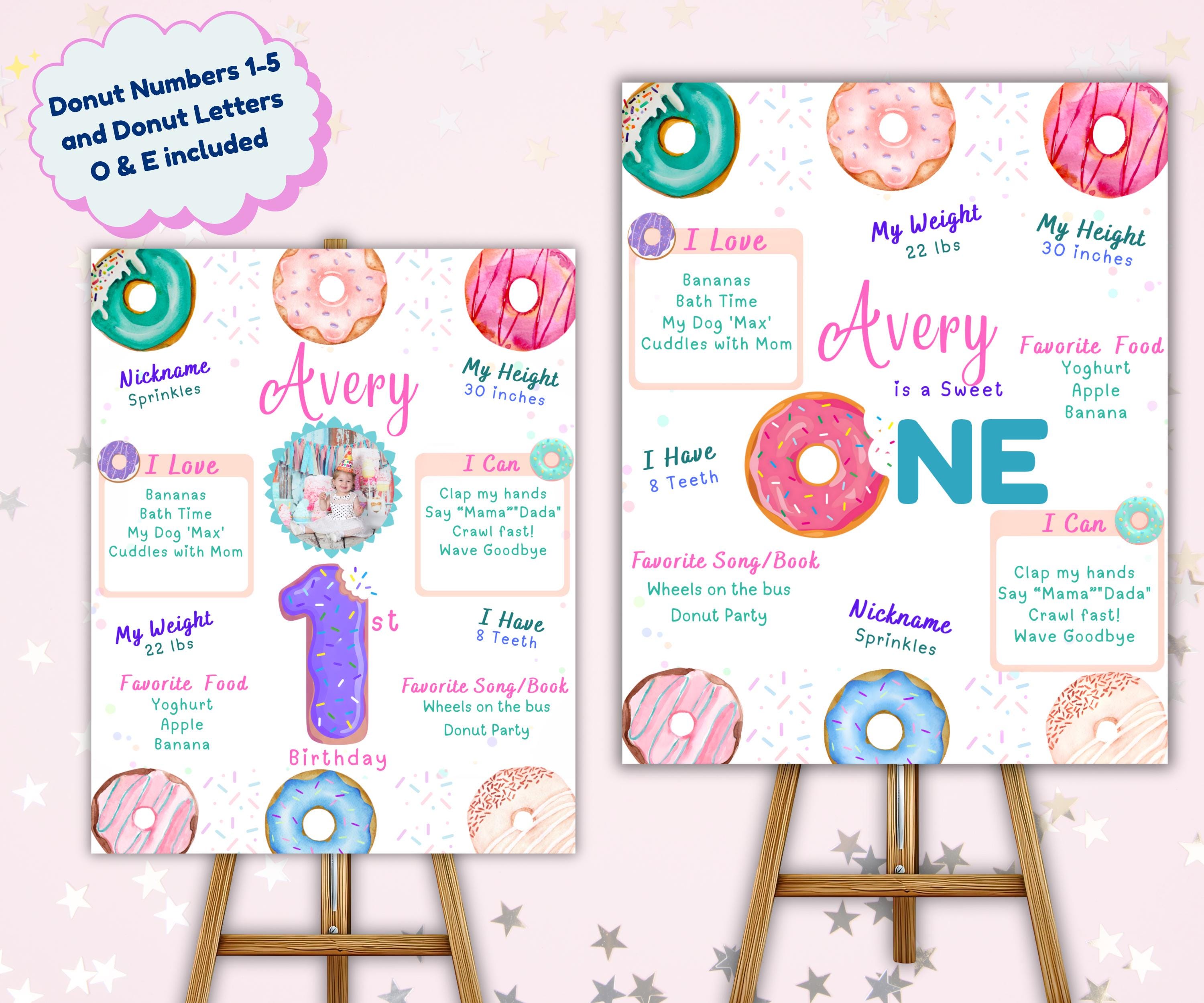
- Reusable for ages 1-5 — Includes donut numbers for future birthdays
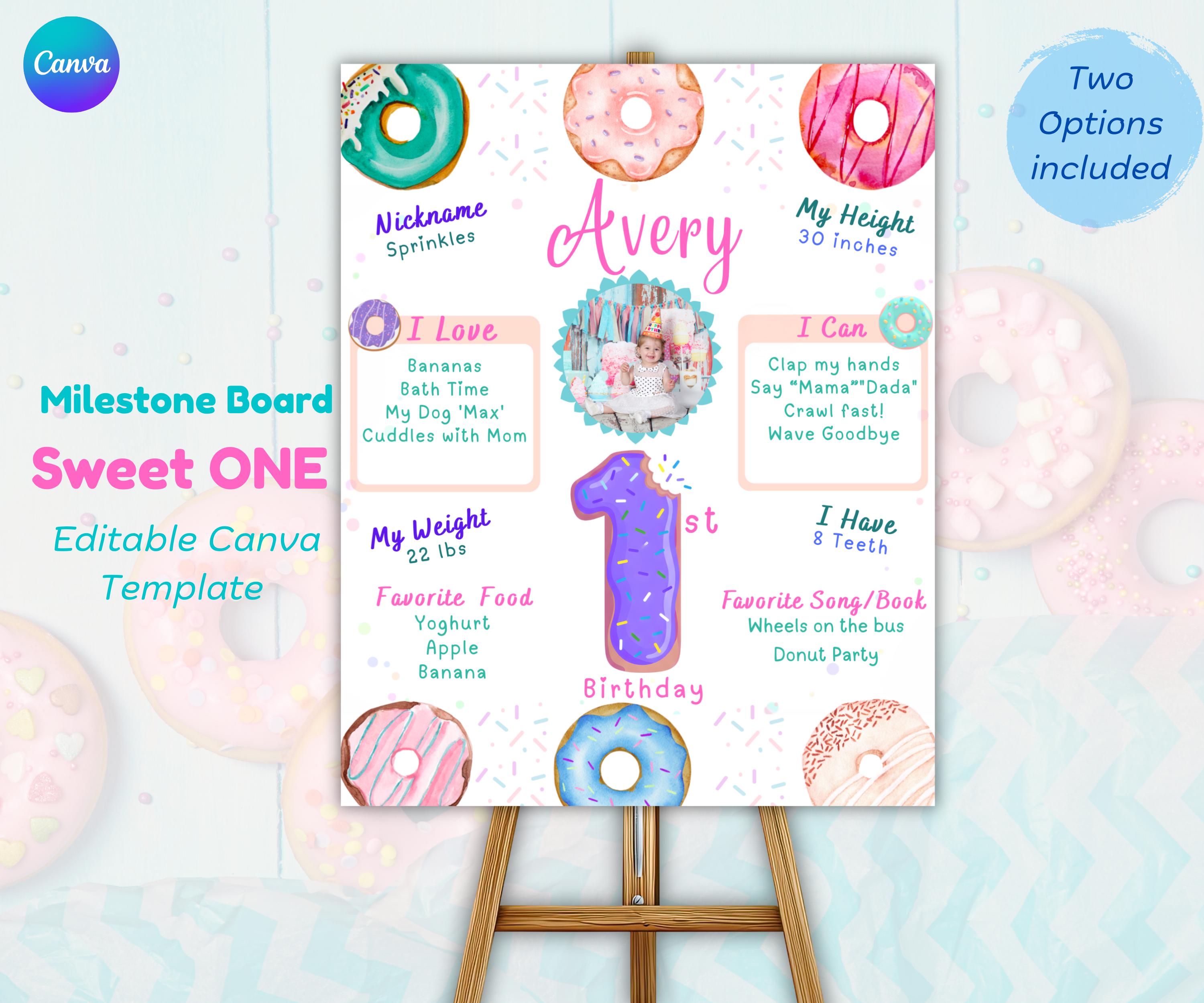
- Two versions included — Photo version + no-photo option
- Instant download — Start editing within minutes of purchase
Want to see the complete Sweet One collection? Check out our Sweet One Birthday Party Ideas Guide for full theme inspiration.
What You Need Before You Start
This tutorial uses our Sweet One Donut Milestone Board template. Here’s what you’ll need:
- Free Canva account — Works on computer, tablet, or phone
- Internet connection — Canva is cloud-based
- 5-10 minutes — That’s all it takes to customize
- Your child’s details — Weight, height, favorites, etc. (see checklist below)
No design experience required. The template is pre-formatted with professional fonts, colors, and layout. You just click and type—like editing a document.
Step-by-Step: How to Edit Your Donut Milestone Board
Follow these steps to customize your printable milestone board. We’ll cover both the photo version and the no-photo version.
Step 1: Access Your Template
After purchasing, you’ll receive a PDF with two Canva template links:
- Photo Version — Includes a teal scalloped frame for your child’s picture
- No-Photo Version — Text-only design (great if you don’t have a good photo yet)
Click the link for the version you want to edit first. The template will open in your Canva account automatically.
Step 2: Edit the Header Text
At the top of the board, you’ll see text that says something like “Avery’s Sweet One”.
Click on the text box and type your child’s name. You can also change this to:
- “[Name]’s First Birthday”
- “One Sweet [Name]”
- “[Name] is Turning One”
Pro tip: The font is pre-selected for readability. You can change the color, but we recommend keeping the hot pink or teal to match the donut theme.
Step 3: Update the Stats Section
This is where you add all those adorable first-year details. Click each text box and type in your information:
- Birth Date — When your little one was born
- Birth Weight — “7 lbs 3 oz” or similar
- Current Weight — What they weigh now at one year
- Height — Current height in inches or centimeters
- Teeth — How many teeth they have (or “Just 2!” etc.)
Don’t worry about perfect formatting. The text boxes are sized to fit typical answers. If your text runs long, you can reduce the font size slightly using Canva’s toolbar.
Step 4: Add Favorite Things
The “I Love” and “I Can” sections are where personality shines. These fill-in-the-blank prompts capture what makes your one-year-old unique:
- I Love to Eat: “Blueberries, yogurt, and cheese puffs”
- I Love to Play With: “My stuffed bunny and stacking rings”
- I Can Say: “Mama, Dada, and ‘uh-oh'”
- I Can Do: “Wave bye-bye, clap hands, and stand alone”
- My Favorite Book: “Goodnight Moon”
- My Favorite Song: “Baby Shark (of course!)”
Keep it authentic. These details make the board meaningful. Five years from now, you’ll love remembering that they were obsessed with cheese puffs at age one.
Step 5: Add a Photo (Optional)
If you’re using the photo version, here’s how to add your child’s picture:
- Click on the teal scalloped frame on the left side
- Click “Uploads” in the left Canva toolbar
- Upload your favorite 1-year-old photo
- Drag the photo into the frame—it will auto-fit
- Adjust the crop by double-clicking the image
Photo tip: Use a well-lit photo with a simple background. Close-up shots work best since the frame is relatively small.
Step 6: Change the Age Number (For Future Birthdays)
Here’s the best part: this template isn’t just for 1st birthdays. Your download includes donut numbers 1 through 5, so you can reuse this for ages 2, 3, 4, and 5.
To change the number:
- Click on the large donut number in the center
- Delete the “1”
- Type “2”, “3”, “4”, or “5”
- Adjust the font size if needed
Bonus: The donut letter “O” can be swapped with letter “E” for ages Three and Five (for “ThreE” and “FivE” wordplay).
Step 7: Download and Print
Once you’re happy with your edits, it’s time to download:
- Click “Share” in the top right corner
- Click “Download”
- Select “PDF Print” (this gives you the highest quality)
- Click “Download” again
Your file will save to your computer. Now you’re ready to print!
Where to Print Your Milestone Board
The template is sized at 16×20 inches, which is a standard poster frame size. Here are your best printing options:
Option 1: Local Print Shop (Recommended)
Stores like Staples, Office Depot, Walgreens, or FedEx can print this as a poster or foam board.
- Cost: $5-15 depending on material
- Material: Ask for foam board or thick cardstock
- Turnaround: Same-day or next-day
Foam board looks most professional and can stand on an easel without a frame.
Option 2: Home Printer
If you have a large-format printer, you can print at home on heavy cardstock (110lb or heavier).
- Cost: $2-5 for cardstock
- Material: White cardstock, glossy or matte
- Turnaround: Immediate
For best results, select “High Quality” or “Photo” in your printer settings.
Option 3: Online Print Service
Services like Vistaprint, Shutterfly, or Snapfish can print and ship to your door.
- Cost: $10-25 including shipping
- Material: Various options (poster, foam, canvas)
- Turnaround: 3-7 business days
This is convenient but plan ahead for shipping time.
Tips for a Professional-Looking Milestone Board
Want your board to look like it came from a boutique party planner? Follow these tips:
1. Keep Text Concise
Short answers look cleaner. Instead of “She loves to eat organic blueberry yogurt with granola every morning,” just write “Blueberry yogurt”.
2. Use Consistent Formatting
If you write weight as “7 lbs 3 oz,” don’t write height as “28 inches.” Use “28 in” to match the abbreviation style.
3. Choose a Recent Photo
Use a photo taken within 2-3 weeks of the party. You want the board to reflect how your child looks now, not at 6 months old.
4. Display at Eye Level
Place the board on an easel or table where guests can easily see it. Near the cake table or photo backdrop works perfectly.
5. Keep It as a Keepsake
After the party, store the board flat in a large envelope or portfolio. It makes a wonderful keepsake to show your child when they’re older!
Complete the Sweet One Look
Your milestone board looks best when it matches the rest of your party decorations. Here’s how to create a cohesive donut-themed first birthday:
Matching items in our Sweet One collection:
- Welcome Sign — Greet guests at the entrance with matching donut design
- Birthday Invitation — Set the theme before the party even starts
- Complete Bundle — Get all three items together and save 50%
Want to see how it all comes together? Check out our Sweet One Birthday Party Ideas Guide for full theme inspiration, food ideas, and decoration tips.
Planning a different theme? We also have a Wild One Safari Milestone Board tutorial for jungle-themed parties.
How Do You Make a Donut Milestone Board?
Print an editable donut milestone template, fill in your baby’s stats, print it at 16×20 inches through a photo service or at home on card, then mount it on a foam board or wooden easel beside the cake table. Start to finish it takes about twenty minutes, most of which is typing.
Best Value ⭐ Save 50%
Sweet One Donut Birthday Bundle
Instant Digital Download
Sweet One Milestone Board
Instant Digital Download
Sweet One Welcome Sign
Keep Reading
- Sweet One Donut Birthday Party Guide
- How to Make a Wild One Milestone Board
- First Birthday Cake Ideas
Frequently Asked Questions
Can I use this for ages other than 1?
Yes! The template includes donut numbers 1 through 5, so you can reuse it for ages 2, 3, 4, and 5. The letter “O” can also be swapped with “E” for “ThreE” and “FivE” wordplay.
Do I need Canva Pro?
No! A free Canva account works perfectly. All fonts, colors, and elements in this template are available in the free version.
Can I edit this on my phone?
Yes, Canva works on phones and tablets. However, we recommend using a computer or laptop for easier editing, especially when adding photos.
What if I make a mistake?
No worries! Canva has an undo button (Ctrl+Z or Cmd+Z). You can also delete any element and start over. Your template saves automatically, so you never lose progress.
Can I print this at home?
Yes, if you have a large-format printer. However, for best results, we recommend professional printing at Staples, Walgreens, or FedEx on foam board or heavy cardstock.
Is this a physical product?
No, this is a digital download only. You receive a PDF with Canva template links. You edit the design yourself and print it at home or at a print shop.
Ready to Create Your Milestone Board?
Your Sweet One donut milestone board is just a few clicks away. In less than 10 minutes, you can have a professional-looking display that captures all the precious details of your little one’s first year.
Whether you buy the individual milestone board or the complete bundle, you’re getting a reusable, editable template that grows with your child from ages 1 to 5.
Need more Sweet One inspiration? Check out these related posts:
- Sweet One Birthday Party Ideas (Complete Guide)
- How to Make a Wild One Milestone Board (Safari Theme)
- 1st Birthday Party on a Budget
Best Value ⭐ Most Popular
Sweet One Donut Birthday Bundle