
I’ll never forget my first tax season as an Etsy shop owner. It was April 2023, and I was sitting at my kitchen table surrounded by crumpled receipts, frantically trying to categorize five months of expenses in QuickBooks. The software that promised to “simplify” my bookkeeping had me in tears at 2 AM, clicking through menus I didn’t understand, trying to figure out why my profit and loss statement showed numbers that made no sense.
That’s when I realized: I didn’t need enterprise accounting software designed for corporations with 50 employees. I needed something simple, visual, and actually useful for a one-person digital business. Something that wouldn’t cost me $360 a year for features I’d never touch.
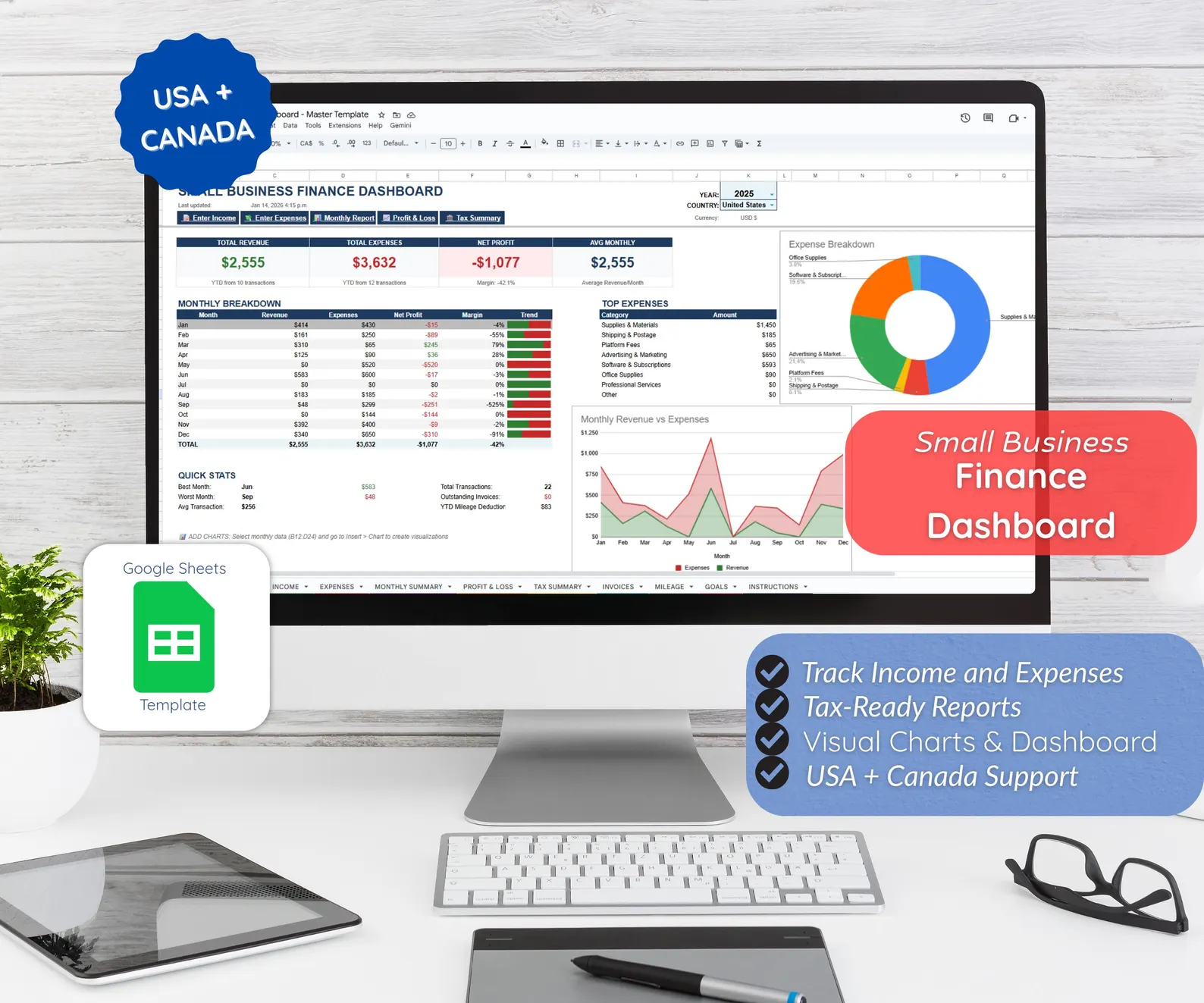
That nightmare led me to create the Small Business Finance Tracker Google Sheets Template—the exact tool I wish I’d had when I started Layer7Designs. And if you’re reading this because tax season is approaching and you’re feeling that familiar panic, I want to share exactly how this simple spreadsheet transformed my business finances from chaos to clarity.
Instant Digital Download
Simple Expense Tracker Spreadsheet — Google Sheets
The Reality Check: Most Small Business Owners Are Struggling
Here’s something that made me feel less alone when I discovered it: 60% of small business owners admit they don’t feel knowledgeable about accounting. When I started selling custom digital birthday invitations on Etsy, I thought I was the only one who felt completely lost when it came to bookkeeping.
Even more eye-opening? 70% of small businesses don’t have an accountant, and 64% of us are handling our own bookkeeping. We’re talented at what we do—whether that’s designing party invitations, creating handmade products, or providing services—but financial management? That’s a completely different skill set most of us never learned.
Why I Initially Resisted “Real” Accounting Software
When Layer7Designs started gaining traction, well-meaning business advisors told me I needed QuickBooks or FreshBooks to be “professional.” So I dutifully signed up for QuickBooks Self-Employed at $15/month, thinking it was a necessary business expense.
Within two weeks, I knew I’d made a mistake. The software was overwhelming for my needs:
Too Many Features I Didn’t Need: Multi-user access? Payroll integration? Advanced inventory management? I was a solo entrepreneur selling digital files—I needed income tracking and expense categorization, not enterprise features.
Steep Learning Curve: I spent hours watching tutorial videos trying to understand chart of accounts, journal entries, and reconciliation. Time I should have spent creating new party planning guides and growing my business.
Cost That Added Up Fast: That $15/month became $180/year. For a small shop making $30,000 annually, that was real money—money that could buy supplies, advertising, or even just groceries.
Overkill for My Actual Needs: I wasn’t running a manufacturing company. I was tracking Etsy sales, platform fees, design software subscriptions, and occasional supply purchases. I needed simple organization, not complex accounting.
Research backs up my frustration: 51% of small businesses with 1-19 employees don’t use accounting software, and when asked why, 50% said manual methods or spreadsheets work better for them. We’re not avoiding technology because we’re old-fashioned—we’re avoiding unnecessary complexity.
My First Tax Season Nightmare (And Yours Doesn’t Have To Be)
Let me paint you a picture of my 2023 tax season disaster. I’d been running Layer7Designs for eight months, selling digital invitations and building a customer base. Business was going well—until I realized I had to file Schedule C with my taxes.
I had:
- Screenshots of Etsy sales (but not organized by month)
- A mix of business and personal expenses on the same credit card
- Mileage logs for a few business trips (but not all of them)
- Receipts… somewhere… maybe in my email?
- No idea what my actual profit was
Sound familiar?
37% of small business owners say tax time makes them feel nervous, scared, or overwhelmed. I was definitely in that group. And the consequences of poor organization were real:
Hours of Wasted Time: I spent approximately 30 hours that April reconstructing my finances. That’s nearly a full work week I could have spent creating new products or serving customers.
Missed Deductions: Because I hadn’t tracked mileage properly, I probably missed out on hundreds of dollars in deductions. At 73¢ per kilometer (the 2026 CRA rate), even modest business driving adds up quickly.[
Stress and Uncertainty: Not knowing if my tax return was accurate kept me up at night. Had I missed income that would trigger an audit? Had I claimed deductions I couldn’t actually prove?
Higher Accounting Fees: When I finally gave up and hired an accountant, they charged extra because my records were a mess. Their exact words: “This would cost half as much if your information was organized.”
That experience taught me something crucial: good bookkeeping isn’t about fancy software. It’s about consistent tracking and simple organization.
Why I Built My Business on Google Sheets (And Why It Works)
After my QuickBooks disaster, I went back to basics. I needed a financial tracking system that:
✓ Was simple enough to use weekly without watching tutorials
✓ Didn’t require a monthly subscription
✓ Worked on my phone when I was at the post office or supply store
✓ Showed me visual charts so I could actually understand my finances
✓ Pre-organized expenses for Schedule C (since I file in the USA) or T2125 (for my Canadian customers)
✓ Could grow with my business without forcing me to switch platforms
Google Sheets checked every box. Here’s why it became the foundation of my business finances:
1. It’s Genuinely Free (No Hidden Costs)
Google Sheets costs exactly $0 if you have a Gmail account. No monthly fees. No annual renewals. No “upgrade to Premium for essential features” upsells. For a bootstrapped business, that financial predictability matters.
Over five years, choosing Google Sheets over QuickBooks Self-Employed saved me $900. That’s real money I reinvested in growing Layer7Designs—money that funded affordable design tools and marketing efforts.
2. It Works Everywhere I Do
As a parent running a business, I don’t always work at a desk. I might be:
- Waiting in the school pickup line (quick expense entry)
- At the post office shipping samples (checking my monthly budget)
- At a coffee shop meeting with a potential wholesale client (reviewing my profit margins)
- Traveling for a family event (logging mileage)
Google Sheets works seamlessly across my laptop, tablet, and phone. I can make a quick entry anywhere, and it syncs instantly to all my devices. No downloads, no separate mobile app with limited features, no version conflicts.[spreadsimple]
3. The Learning Curve Is… Nonexistent
If you can add numbers in a column, you can use Google Sheets. Unlike specialized accounting software with its own vocabulary and workflows, spreadsheets work the way most people naturally think: rows and columns, simple formulas, clear labels.
I taught my spouse (who has zero accounting background) to enter expenses in my tracker in about 10 minutes. Try doing that with QuickBooks.
4. Visual Charts Made Me Actually Understand My Business
Here’s something I didn’t expect: seeing my finances as charts instead of numbers changed everything.
My Google Sheets dashboard shows:
- Bar chart: Monthly revenue vs. expenses, so I can instantly spot problem months
- Donut chart: Expense breakdown by category, revealing where my money actually goes
- Line chart: Cumulative profit trend, showing business growth (or warning me early if things decline)
These visuals helped me make better business decisions:
- I noticed my software subscriptions were eating 12% of revenue—way too high. I cancelled tools I barely used.
- I saw that marketing expenses in September (back-to-school season) generated 3x ROI, so I increased that budget the following year.
- I discovered that months when I launched new birthday party themes had significantly higher revenue, validating my product strategy.
Numbers alone never gave me these insights. The visual element made me financially literate in my own business.
5. Automation Without Complexity
With the right template (more on this shortly), Google Sheets can automate 95% of the math:
- Income minus fees = net revenue (automatically calculated)
- Expenses sorted by category, totaled by month and year (automatic)
- Mileage logged, deduction calculated at current rates (automatic)
- Profit and loss statement updated in real-time (automatic)
This gives you the efficiency of accounting software without the complexity or cost.
The Template I Wish I’d Had From Day One
After two years of refining my own tracking spreadsheet, I realized other Etsy sellers and small business owners probably had the same struggles I did. So I packaged everything I’d learned into the Small Business Finance Tracker Google Sheets Template—the exact tool I wish I’d had in 2023.
Here’s what I built based on my real-world needs:
Dashboard: Your Financial Command Center
The dashboard gives you a complete snapshot of your business finances the moment you open the spreadsheet. I designed it to answer the questions I ask myself every week:
- What’s my profit this month compared to last month?
- Am I on track to hit my annual revenue goal?
- Where is most of my money going?
- Are my expenses increasing faster than revenue?
Three visual charts show these trends instantly. No digging through reports or running queries—just open the file and know where you stand.
As someone who also creates party planning resources, I know the importance of seeing the big picture at a glance. This dashboard brings that same clarity to finances.
Income Tracker: Every Dollar Accounted For
This is where you log every sale, payment, or revenue source. What makes it powerful:
Platform Fee Calculation: Etsy charges transaction fees, payment processing fees, and potentially advertising fees. The template automatically calculates net income after these deductions, so you know your actual revenue.
Multiple Income Sources: I don’t just sell on Etsy—I also offer custom design services and occasionally do wholesale orders. The tracker handles all revenue streams without getting cluttered.
Monthly and Annual Summaries: Automatically tallied, so you always know your year-to-date income without manual calculations.
When I was developing my cost guides for custom invitations, accurate income tracking helped me understand my true profitability after platform fees.
Expense Tracker: Tax-Ready Organization
This feature alone has saved me dozens of hours during tax season. Every expense gets categorized using the exact categories that appear on Schedule C (USA) or T2125 (Canada):
USA Schedule C Categories:[turbotax.intuit]
- Line 8: Advertising
- Line 9: Car and truck expenses
- Line 18: Office expense
- Line 22: Supplies
- Line 25: Utilities
- And 20+ other IRS-recognized categories
Canada T2125 Categories:[xero]
- Motor vehicle expenses
- Supplies
- Legal and accounting fees
- Business-use-of-home expenses
- And all other CRA-approved categories
When tax time arrives, you don’t reconstruct anything. Every expense is already sorted exactly as your tax forms require. Just export the summary and hand it to your accountant (or use it to complete your own return).
This feature alone is worth the template price. I used to spend 15+ hours organizing expenses every April. Now it takes 30 minutes.
Mileage Tracker: Maximize Your Deductions
Business mileage is often one of the largest deductions available to self-employed individuals, yet most people under-track it.
The mileage tracker lets you log:
- Date of trip
- Starting point and destination
- Purpose (required for IRS/CRA compliance)
- Distance (kilometers or miles)
The template automatically calculates your deduction using 2026 rates:
- Canada: 73¢/km for first 5,000 km, then 67¢/km[canada]
- USA: 72.5¢/mile[getfuelshine]
Last year, my mileage deduction totaled $847 CAD. That’s real money I would have left on the table if I hadn’t tracked properly.
Invoice Tracker: Never Lose Track of Unpaid Work
When I started offering custom digital invitation design services, I needed a simple way to track which clients had paid and which invoices were outstanding.
The invoice tracker shows:
- Client name
- Invoice date and due date
- Amount
- Payment status (paid/unpaid)
- Days overdue (calculated automatically)
At a glance, I can see exactly who owes me money and follow up on overdue payments. This improved my cash flow significantly—I no longer forget about unpaid invoices that slip through the cracks.
Profit & Loss Statement: Professional Reporting
When I needed a small business loan last year, the bank requested financial statements. Without an accountant or expensive software, I worried I couldn’t provide proper documentation.
The template’s P&L statement solved that problem. It automatically generates a professional profit and loss report showing:
- Total revenue by source
- Total expenses by category
- Net profit/loss by month and year-to-date
- Profit margin percentage
I exported this statement, provided it to the bank, and they accepted it without question. Professional doesn’t require expensive software.
Multi-Year Tracking: Historical Insights
The year selector feature lets you track multiple years in one file, then switch between them instantly. All reports filter automatically to show only the selected year.
This has been invaluable for:
- Comparing year-over-year growth (“Revenue increased 42% from 2024 to 2025!”)
- Identifying seasonal patterns (December is always my best month thanks to winter party themes)
- Preparing multi-year financial summaries for loan applications
- Understanding long-term business trends
Most basic spreadsheets make multi-year tracking cumbersome. This template makes it effortless.
USA + Canada Dual Support: One Template, Two Tax Systems
When I expanded Layer7Designs to serve customers in both countries, I faced a dilemma: my financial tracking was set up for Canadian tax forms, but I needed to file in the USA.
Rather than maintain two separate systems, I built the country toggle into the template. Select “USA” or “Canada,” and everything adjusts:
Currency: USD $ or CAD $
Tax Forms: Schedule C references vs. T2125 categories
Mileage: Miles and ¢/mile vs. kilometers and ¢/km
Tax Deadlines: Quarterly due dates (USA) vs. June 15 filing (Canada)
This flexibility means the template serves entrepreneurs on both sides of the border without compromise.
The Real Cost Comparison: What I Actually Save
Let me show you exactly what choosing this template over subscription software saves me annually:
What I Was Paying (Before the Template)
QuickBooks Self-Employed:
- Monthly cost: $15[unclekam]
- Annual cost: $180
- Features I actually used: ~20%
Plus Additional Costs:
- Extra accountant fees for disorganized records: ~$150/year
- Time cost (30 hours at $30/hour value): $900/year
- Stress and anxiety: Priceless (but real)
Total Annual Cost: $1,230+ in direct and indirect costs
What I Pay Now (With the Template)
Small Business Finance Tracker Template:
- One-time cost: CA$26.24 (approximately $19.50 USD)
- Annual cost: $0 (use forever)
- 5-year total: $19.50
Plus Reduced Additional Costs:
- Accountant fees (organized records): $75/year (50% reduction)
- Time cost (5 hours at $30/hour value): $150/year (85% reduction)
- Stress: Minimal (everything’s organized year-round)
Total 5-Year Comparison:
- QuickBooks route: $6,150+
- Template route: $394.50
- Savings: $5,755.50
That’s not a typo. Over five years, simple spreadsheet tracking saves me over $5,700 compared to the subscription software path I started on.
For a small business, that money funds:
- Marketing campaigns
- New equipment or supplies
- Emergency fund buffer
- Owner compensation (yes, paying myself!)
When customers ask about my pricing for digital invitation services, I can keep costs competitive because my overhead is low. That’s a direct business advantage.
Who Gets The Most Value From This Tracker?
Based on my experience running Layer7Designs and talking to hundreds of customers, here’s who benefits most:
Etsy Sellers and Digital Product Creators
If you’re selling on Etsy—whether that’s custom invitations, handmade crafts, printables, or digital downloads—you face unique tracking challenges:
- Multiple fee types (listing, transaction, payment processing, advertising)
- Digital and physical product mix
- Seasonal sales fluctuations
- Supply costs that vary by product
I built this template specifically with Etsy sellers in mind because I am one. Every feature addresses a real need I encountered.
40% of full-time Etsy sellers lack sufficient emergency savings, often because they don’t have clear visibility into true profitability. This template shows your real profit after all fees, helping you make informed decisions.[etsy]
Freelancers and Service Providers
Whether you’re a graphic designer, writer, consultant, or coach, you deal with:
- Irregular income from different clients
- Billable expenses requiring documentation
- Mileage for client meetings
- Software subscriptions and tools
- Quarterly estimated tax payments
The invoice tracker and expense categorization are particularly valuable for service businesses. I’ve had customers who are virtual assistants, wedding photographers, and consultants tell me the template transformed their financial management.
Side Hustlers Balancing Multiple Income Sources
If you’re building a business while working full-time (like I did initially), you need:
- Quick entry (5-10 minutes weekly, not hours monthly)
- Clear separation between business and employment income
- Accurate tracking to know if your side hustle is actually profitable
- Tax-ready organization for Schedule C alongside W-2 income
The template’s automation means bookkeeping doesn’t become another exhausting task on top of your already-full schedule.
Party Planners and Event Professionals
Running Layer7Designs taught me that party professionals—planners, decorators, entertainers—have financial tracking needs similar to mine:
- Per-event income and expense tracking
- Vendor payments
- Supply costs per event
- Mileage to venues
- Seasonal business cycles
If you plan budget-friendly birthday parties or large celebrations, tracking profitability per event helps you price accurately and grow sustainably.
Solopreneurs Who Want Control
Maybe the most important quality: you want to understand your finances yourself, not outsource that knowledge to software or accountants.
I’m not anti-accountant (I still use one for tax filing), but I wanted to know my numbers. To make informed decisions daily, not wait for monthly reports.
If that resonates, this template gives you financial literacy in your own business without requiring an accounting degree.
How I Actually Use This Template (Weekly Routine)
Let me walk you through my actual process. This isn’t theoretical—this is exactly what I do every Sunday evening:
Sunday Evening (15 minutes)
1. Review Etsy Sales (5 minutes)
- Open my Etsy shop dashboard
- Check total sales for the week
- Note any platform fees
- Enter net income in the Income Tracker
2. Log Expenses (7 minutes)
- Open my business credit card statement
- Add any new charges:
- Design software subscription → Office Expense category
- Shipping supplies → Supplies category
- Facebook ad spend → Advertising category
- Coffee meeting with potential client → Meals & Entertainment
- All categories align with Schedule C, so I don’t overthink it
3. Mileage (2 minutes)
- If I had any business driving that week (rare, since I’m mostly digital), log it in the Mileage Tracker
- The deduction calculates automatically
4. Quick Dashboard Check (1 minute)
- Glance at the visual charts
- Am I on track for my monthly goal?
- Any unusual expenses I should investigate?
That’s it. Fifteen minutes, once a week. The consistency means I’m never scrambling to reconstruct months of transactions, and I always know where my business stands financially.
Monthly Review (30 minutes)
Once a month, I spend about 30 minutes with the template:
Analyze Trends:
- Is revenue growing compared to last month?
- Which expense categories are increasing?
- Am I hitting my profit margin targets?
Adjust Budget:
- If I’m overspending in a category, I make conscious adjustments
- If revenue exceeds expectations, I might allocate more to marketing
Plan Ahead:
- Based on trends, what do I expect next month?
- Are there upcoming expenses I should budget for?
- Should I adjust pricing on any products?
This monthly discipline has made me a better business owner. I catch problems early and capitalize on opportunities faster because I have real-time financial visibility.
Tax Time (2 hours total)
In previous years, tax time meant weeks of stress. Now it’s almost anticlimactic:
Export Tax Summary:
- Open the Tax Preparation Summary tab
- All expenses are already organized by Schedule C lines
- Export as PDF or print
Mileage Documentation:
- Mileage Tracker shows total deduction with trip-by-trip detail
- IRS/CRA compliant records already prepared
Profit & Loss:
- Professional P&L statement ready to share with accountant
- Year-over-year comparison if needed
Hand to Accountant:
- Organized summary instead of shoebox of receipts
- My accountant actually thanked me and charged less
From 30+ hours of chaos to 2 hours of organized preparation. That’s the transformation that made me create this template for others.
Beyond Finance: What This Template Taught Me About Business
Here’s something unexpected: tracking my finances properly taught me lessons that improved my entire business, not just bookkeeping.
1. Pricing Strategy
When I launched Layer7Designs, I priced my custom invitation services based on what competitors charged. But I didn’t actually know if I was profitable at those prices.
The expense tracker revealed my true cost per design:
- Software subscriptions (Photoshop, Illustrator, Canva Pro)
- Fonts and graphics licenses
- Etsy listing and transaction fees
- Time investment
Seeing these real numbers, I realized I was underpricing by about 30%. I raised prices, expecting to lose customers—but I didn’t. Revenue increased, profit margins improved, and I could invest more in quality.
You can’t price strategically without knowing your actual costs. This template gives you that knowledge.
2. Seasonal Planning
The visual charts revealed patterns I’d sensed but never confirmed:
- September-October: Huge spike (back-to-school and fall birthday parties)
- November-December: Strong (holiday parties and winter themes)
- January-February: Dip (post-holiday slowdown)
- March-May: Recovery (spring birthdays and graduation parties)
Now I plan inventory, marketing, and product launches around these patterns. I invest heavily in advertising during peak months and use slow months for product development and strategic planning.
3. Investment ROI
When I spend money on my business, I want to know it’s working. The template helps me track:
- Marketing: Which channels generate actual sales vs. just visibility
- Tools: Which subscriptions I actually use vs. those I forget about
- Education: Whether that $500 course improved my income
One example: I was spending $80/month on three different design tools with overlapping features. The expense tracker made this waste visible. I consolidated to one tool, saving $720/year with no loss in capability.
4. Tax Reduction Strategies
Seeing my expenses organized by deduction category helped me identify missed opportunities:
- Home Office: I wasn’t claiming business-use-of-home until I saw how much I could legally deduct
- Professional Development: Courses and conferences became intentional business expenses, not personal splurges
- Mileage: I started tracking all business driving, not just obvious trips
These strategies are completely legal and common, but I didn’t think about them until organized financial data made them visible.
How to Get Started With the Template
If you’re ready to transform your financial tracking from stressful obligation to simple weekly routine, here’s exactly how to start:
Step 1: Get the Template
Purchase the Small Business Finance Tracker Google Sheets Template from my Etsy shop:
→ [GET THE SMALL BUSINESS FINANCE TRACKER] ←
You’ll receive instant access to a download link. No waiting, no physical shipping—it’s a digital product, just like my custom invitation designs.
Current pricing: CA$26.24 (regularly CA$34.99)—less than two months of the cheapest accounting software subscription.
Step 2: Make Your Copy
Click the download link to open the template in Google Sheets, then:
- Go to File → Make a Copy
- This saves it to YOUR Google Drive
- Rename it something like “2026 Business Finances – [Your Business Name]”
- Now you own your copy and can modify anything you want
Step 3: Configure Basic Settings (5 minutes)
- Select your country (USA or Canada) from the dropdown
- Choose your business year (2026)
- Everything else adjusts automatically—currency, tax forms, mileage rates
Step 4: Explore With Sample Data
The template includes pre-filled examples showing how everything works. Spend 10-15 minutes clicking through:
- See how income entries update the dashboard
- Notice how expenses auto-categorize for taxes
- Check out the visual charts
- Review the P&L statement format
This familiarization helps you understand the flow before adding your own data.
Step 5: Clear Samples and Start Fresh
Delete the sample data when you’re ready (instructions included in the User Guide tab). Now you have a clean template ready for your business.
Step 6: Enter Your Current Year Data
If we’re already partway through 2026:
- Gather your records for the year so far
- Enter income and expenses month by month
- Don’t worry about perfect accuracy—get it reasonably close
- The important thing is starting fresh from today forward
Step 7: Establish Your Weekly Routine
Pick a specific time each week (I use Sunday evenings) to:
- Enter the week’s income and expenses
- Log any mileage
- Spend 15 minutes maximum
- Make it non-negotiable, like any other business commitment
Consistency is more important than perfection. Even if you miss a week, catch up at your next session. The habit is what transforms your financial management.
Common Questions I Get About the Template
“I’m not good with spreadsheets. Will I struggle?”
If you can add and subtract, you can use this template. I designed it for creative entrepreneurs (like me) who aren’t accountants or math experts.
Everything that requires formulas is pre-built. You just enter simple data:
- Date, description, amount
- Select category from dropdown
- That’s it
The template does all calculations automatically. No formulas to write or understand.
“Can I customize it for my specific business?”
Absolutely! Once you make a copy, it’s yours to modify however you want:
- Add expense categories specific to your industry
- Customize the dashboard charts
- Create additional tracking sheets
- Adjust the layout or colors
I’ve had customers who added inventory tracking, customer lifetime value calculations, and product-specific profit margins. The foundation is solid, but you can build on it.
“What if my business grows beyond what a spreadsheet can handle?”
That’s a wonderful problem to have! The template works well for most solopreneurs and small businesses up to about $100,000-200,000 in annual revenue.
Beyond that, you might benefit from dedicated accounting software—but you’ll have years of organized historical data to migrate. And you’ll know exactly what features you actually need, making the transition strategic rather than overwhelming.
“Does this replace my accountant?”
No, and it’s not meant to. I still work with an accountant for tax filing because I want professional guidance on deductions and compliance.
What the template does is make your accountant’s job easier (and potentially less expensive). Instead of handing them a box of receipts, you provide organized summaries. They spend less time on data entry and more time on strategic advice.
Think of it this way: the template is your daily financial management tool. Your accountant is your periodic strategic advisor. Both have value.
“Will this work for Canadian tax requirements?”
Yes! Toggle to “Canada” mode and the template:
- Uses CAD currency
- Organizes expenses by T2125 categories
- Calculates mileage in kilometers at CRA rates (73¢/km for first 5,000 km, then 67¢/km)[canada]
- References June 15 filing deadline (April 30 payment due)
I designed it for both countries because I have customers in both and didn’t want to maintain separate products.
“What if I need help or have questions?”
Message me directly through Etsy! I’m responsive and genuinely want this to work for you. Most questions are answered within 24 hours.
The template also includes a comprehensive User Guide tab with step-by-step instructions, examples, and troubleshooting tips.
My Invitation: Take Control of Your Finances Today
I remember vividly how overwhelming business finances felt in my early days. The stress of tax season. The confusion about whether I was actually profitable. The guilt about spending on my business without knowing if I could afford it.
That confusion is why 37% of small business owners feel nervous or scared during tax season. It’s why 32% struggle to identify deductions and probably overpay. It’s why so many entrepreneurs avoid looking at their finances until they absolutely have to.[futurpreneur]
But it doesn’t have to be that way.
For less than the cost of planning a budget-friendly first birthday party—seriously, CA$26.24—you can have the same financial clarity and peace of mind that transformed my business.
Imagine next April when tax season arrives:
- ✅ All your income and expenses already organized by tax form categories
- ✅ Mileage deductions calculated and documented
- ✅ Professional P&L statement ready to share
- ✅ Accurate records you can confidently provide to your accountant or file yourself
- ✅ No stress, no panic, no 2 AM kitchen table scrambles
That’s the reality this template creates. Not someday after months of setup—literally this week when you start using it.
The Real Value Isn’t Just Money
Yes, you’ll save hundreds of dollars per year compared to subscription software. Yes, you’ll reduce accountant fees. Yes, you’ll maximize tax deductions.[tekpon]
But the real value is confidence in your business. Knowing your numbers. Making strategic decisions based on data, not guesses. Having the financial literacy to grow sustainably.
That’s what this template gave me. That’s what I want for you.
Special Note for Parents Building Businesses
As a parent entrepreneur, I know the unique challenges of building a business around family life. Time is scarce. Energy is limited. Guilt about balancing work and family is real.
Financial tracking that takes 15 minutes per week instead of hours per month? That’s not just convenient—it’s the difference between sustainable and unsustainable.
Whether you’re creating party themes, selling handmade goods, or providing services, you deserve tools that work with your life, not against it.
Your Next Step
I’ve shared my story—the QuickBooks frustration, the tax season nightmare, the template that changed everything. Now it’s your turn.
If you’re tired of financial stress and ready for clarity, grab the template:
→ [GET THE SMALL BUSINESS FINANCE TRACKER NOW] ←
What you’ll get:
- Instant download link to Google Sheets template
- Pre-filled sample data showing how it works
- Complete User Guide with step-by-step instructions
- USA + Canada support in one template
- Lifetime access—use year after year
- Support from me if you need help
Investment: CA$26.24 (regularly CA$34.99)
Time to set up: 15 minutes
Weekly maintenance: 15 minutes
Stress reduction: Immeasurable
Start the year organized. Save hundreds on subscription software. Walk into tax season confident instead of panicked.
Your future self will thank you.
About Layer7Designs
I’m a parent entrepreneur running Layer7Designs from Canada, creating custom digital birthday invitations and party planning resources for families. I built this finance tracker because I needed it myself—and now I’m sharing it with fellow entrepreneurs who deserve simple, effective financial tools without the subscription costs or complexity of traditional accounting software.
Disclaimer: This template is a financial tracking tool, not tax or accounting advice. Consult with a qualified tax professional regarding your specific situation. The template helps organize your financial data but does not replace professional accounting or tax preparation services.